Foundations of Software · Brick 1
Foundations 10 min read
Remember, Change, Send
The first brick — what a system is, and why every computer, program and database is built from just three simple acts
Listen · 10 min
Download for later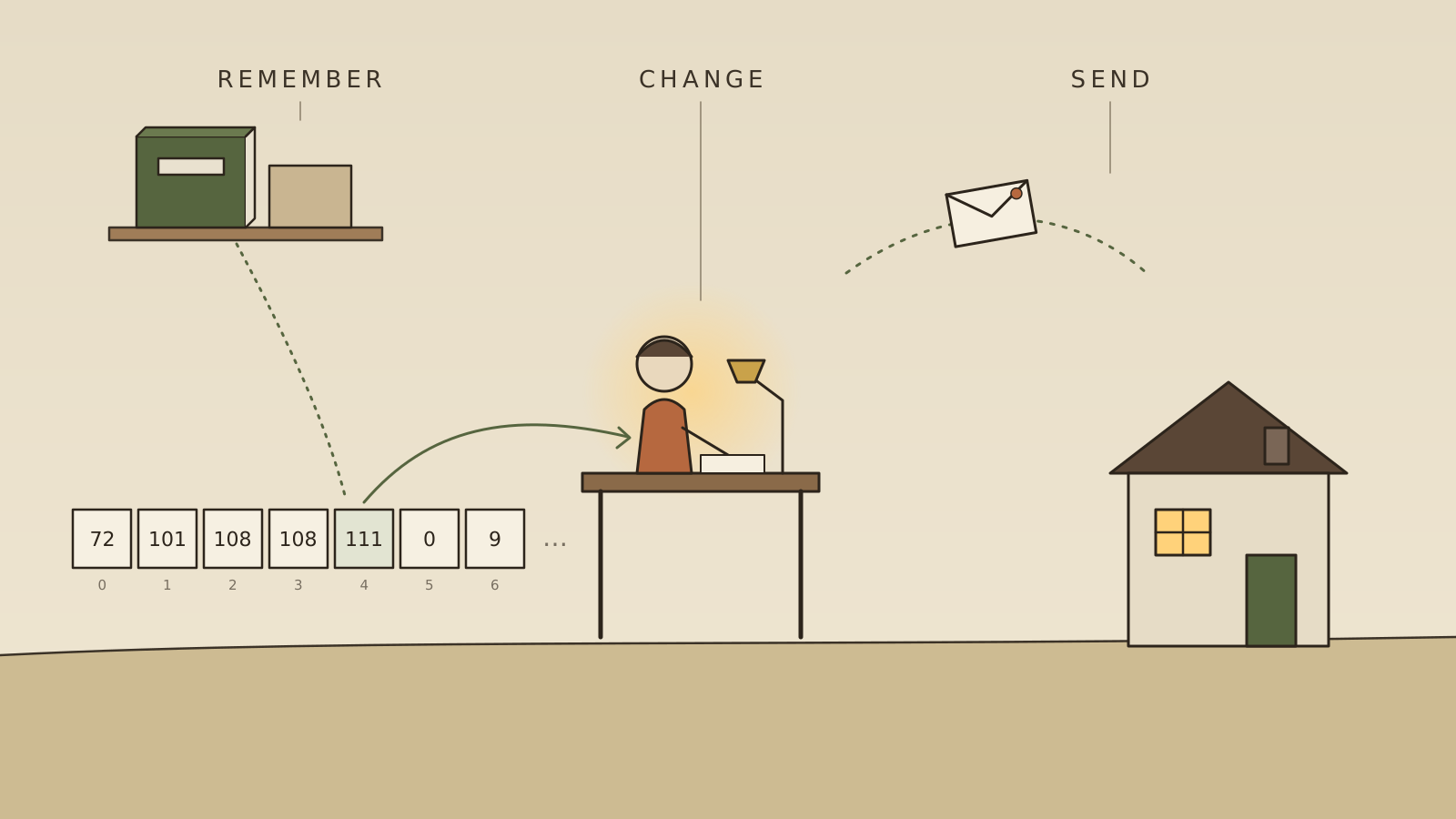
On a Sunday afternoon, a family kitchen is a remarkably busy place. Someone knows what’s left in the cupboard. Someone is chopping onions, turning ingredients into dinner. Someone shouts up the stairs that it’ll be ready in ten minutes. A note on the fridge says we’re out of milk.
Look closely and you’ll notice that everything happening in that kitchen is one of three things:
- Remembering. What’s in the cupboard. The note on the fridge. The recipe.
- Changing. Onions into soup. A list of ingredients into a shopping trip.
- Sending. A shout up the stairs. A text to say buy milk.
Here is the brick this whole series will stand on:
Every computer system ever built, from a pocket calculator to the whole internet, is made of those same three acts: remembering, changing and sending. Nothing else.
Hold on to that. We’re going to take apart a computer, a program, a database and a network, and each time we’ll find the same three things inside.
What is a system?
A system is just a set of parts that work together to do something none of them could do alone, with a boundary around them.
A kettle is a system. Water and electricity go in; hot water comes out. You don’t need to know anything about the heating element to use it. You only need to know what goes in, what comes out, and the switch on the side.
That idea, you can use a thing without knowing what’s inside it, is the single most important idea in software. Computers are far too complicated for anyone to hold in their head at once. They work because they’re built from boxes inside boxes, each with a simple outside and a complicated inside, and each box only has to understand the outsides of the boxes it talks to.
A system, then, has:
- Inputs: what comes in (water, a keypress, a message).
- Outputs: what goes out (hot water, a picture on the screen, a reply).
- State: what it remembers between one moment and the next (whether the kettle is already hot).
- A boundary: a clear line between inside and outside, and a small, agreed way of crossing it.
What is data?
Data is something remembered, written down so it can outlive the moment.
The note on the fridge is data. So is a birthday in a diary, a photograph, a bank balance. Data is a message to the future: this was true, and you’ll want to know it later.
Inside a computer, all data is written as numbers. Not because computers love maths, but because numbers are the easiest thing to build a machine to store. At the very bottom, a computer stores only tiny switches that are either on or off: ones and zeros, called bits. Group eight of them and you can write any whole number from 0 to 255. Group more and you can write bigger ones.
So how do you store a word, a colour or a song as numbers? By agreement.
- We agree that 65 means the letter A, 66 means B, and so on. Now a sentence is a row of numbers. (Look at the boxes in the picture at the top: 72, 101, 108, 108, 111. Read with this agreement, they spell Hello.)
- We agree that a colour is three numbers: how much red, how much green, how much blue. Now a photograph is millions of little triples.
- We agree that a sound is a long list of numbers describing how far the speaker should push the air, thousands of times a second.
The numbers don’t mean anything on their own. Meaning lives in the agreement about how to read them. That agreement is called a format or an encoding, and you’ll meet it again and again, because whenever two parts of a system talk, they first have to agree on how to read each other’s numbers.
What is memory?
Picture a very long street of identical little boxes, each with a number painted on its door: box 0, box 1, box 2, all the way up to several billion. Each box holds one small number.
That’s computer memory. Every box has an address (its door number) and contents (the number inside). To remember something, the computer writes a number into a box. To recall it, it goes to the box and reads it.
There are two kinds of street, and the difference matters:
- Working memory (RAM) is fast, like a whiteboard by the desk. But when the power goes off, it’s wiped clean.
- Storage (the disk or SSD) is slower, like a notebook on the shelf. But it keeps what you wrote, even when the power is off.
A computer constantly copies things from the notebook onto the whiteboard to work on them quickly, and back into the notebook when they need to be kept.
What is a computer?
Now put a clerk at the end of that street.
The clerk is the processor (the CPU). It is astonishingly fast and astonishingly simple-minded. It can only do a handful of things:
- Read a number from a box.
- Do small arithmetic with it, or compare it with another number.
- Write the result into a box.
- Decide which instruction to do next, perhaps jumping elsewhere depending on a comparison.
That’s all. No understanding, no intelligence. But it does these tiny steps billions of times a second, and that turns out to be enough to draw a film, translate a language or land a plane.
And here’s the first real aha: the clerk’s instructions are also just numbers, sitting in the same street of boxes as the data. A program is data that happens to describe what to do. That’s why you can download new software: you’re simply writing new numbers into the boxes, and the clerk starts following them.
Remember, change, send: the boxes remember, the clerk changes, and wires connecting the computer to the screen, the keyboard and the network send.
What is software?
Software is a recipe written down for the clerk.
Nobody writes the clerk’s tiny instructions by hand any more. Programmers write in languages that read a little more like English (if the basket is empty, buy milk), and another program translates that into the millions of tiny steps the clerk understands.
But the most useful way to see software isn’t as a single recipe. It’s as a town of small systems talking to each other.
You asked whether software is really just messages between smaller systems. The answer is yes, at every scale:
- Inside one program, small pieces of code ask each other for things: work out the total of this basket — and get a reply.
- Programs ask the operating system for things: save this file, show this on the screen.
- Apps on your phone ask computers on the other side of the world for things: what’s the weather in Leeds?
Every one of those is the same shape: a box sends a message to another box, which remembers or changes something, and sends a message back. Learn to see that shape and the whole of software starts to look less like magic and more like a very busy, very well-organised post office.
What is a message?
If data is something remembered, a message is data in motion: data on its way from one place to another.
Data at rest sits in memory. Data in motion travels between systems. That’s the whole difference, and every computer system is a constant flow between the two.
A message needs the same few things a postcard does:
- Where it’s going (an address).
- Who it’s from (so a reply can come back).
- What it says (the data itself).
- An agreed format, so the receiver knows how to read it.
The agreed rules for a conversation of messages have a name: a protocol. When you type a web address, your computer sends a small, carefully formatted letter to another computer saying, in effect, please send me this page. That computer reads the letter, finds the page in its memory, and sends it back as another letter. Everything on the internet is that exchange, repeated billions of times.
Why do we need databases?
If memory is a street of boxes, why do we need something called a database?
Because a few things turn out to be very hard, and a database is a system built to do them well, so that the rest of the program doesn’t have to. A database is like a very careful librarian with a very good ledger. Its job is to make sure that data:
- Survives. It’s written to the notebook, not just the whiteboard, so a power cut doesn’t lose your bank balance.
- Can be shared. Thousands of people can read and change it at once without trampling each other’s work.
- Can be found quickly. Like the index at the back of a book, a database keeps indexes so it doesn’t have to read every page to find one name.
- Stays correct. If you move £50 from one account to another, it never leaves the money taken from one and not yet added to the other. Either both happen, or neither does.
That last promise is harder than it sounds, and keeping it is most of what makes a database clever. Remember, change, send: a database is a system that specialises in remembering, very, very carefully.
What is a distributed system?
Sometimes one computer isn’t enough. Too many people need it at once, or the data is too big to fit, or you can’t afford for everything to stop if that one machine breaks.
So you use many computers, in different rooms or different countries, and make them work together by sending messages. That’s a distributed system. Most of the services you use every day (email, maps, online banking) are distributed systems.
Picture villages, rather than one house, each with its own clerk and its own notebook, keeping each other informed by letter. It works beautifully, and it introduces three new problems that a single house never has:
- Letters get lost or arrive late. A message sent is not a message received.
- You can’t tell slow from gone. If a village stops replying, are they busy, or has the bridge collapsed? From where you’re standing, it looks exactly the same.
- Clocks disagree. Each village has its own clock, and no two keep perfectly the same time, so it can be genuinely hard to say which of two events happened first.
Almost every hard problem in modern software comes from these three facts. We’ll come back to each of them in later bricks. For now it’s enough to notice that a distributed system is still made of the same three acts: each village remembers, each village changes, and the villages send. The only new thing is that the sending can’t be trusted.
Putting the brick in place
Let’s follow one small, everyday act through everything we’ve built.
You take a photo of your child and send it to your mother.
- Your phone’s camera turns light into numbers: three for every tiny dot. The phone remembers them in its street of boxes.
- A program changes them, shrinking the photo so it’s quicker to send.
- Your messaging app wraps it in a message (address, sender, contents, format) and sends it.
- Somewhere, a distributed system of computers remembers it long enough to make sure it isn’t lost, and sends it on.
- Your mother’s phone receives the numbers, a program changes them back into coloured dots, and the screen lights up.
Two people, two phones, thousands of computers in between. And not a single step that isn’t remembering, changing or sending.
Where the next bricks go
This piece is the foundation. Everything that follows will stand on it, and each will link back here. Some of the bricks to come:
- Boxes inside boxes: abstraction and interfaces, or how anyone builds something too big to understand.
- The street of boxes, closer up: how memory really works, and why some memory is fast and some slow.
- The post office: how a message actually crosses the world, hop by hop.
- The careful librarian: how databases keep their promises.
- Letters between villages: time, failure and agreement in distributed systems.
One brick at a time. That’s how houses are built, and how understanding is too.
Sources
- Charles Petzold, Code: The Hidden Language of Computer Hardware and Software (1999; 2nd ed. 2022), a gentle book-length walk from switches to software.
- The stored-program idea, where instructions live in the same memory as data, comes from John von Neumann’s First Draft of a Report on the EDVAC (1945).
- Martin Kleppmann, Designing Data-Intensive Applications (2017), for the deeper story of databases and distributed systems.